My Installed Apps - Overview
The My Installed Apps screen gives you an overview of all apps that are installed on your onboarded Edge Devices. Also, you manage and get additional information of these apps.
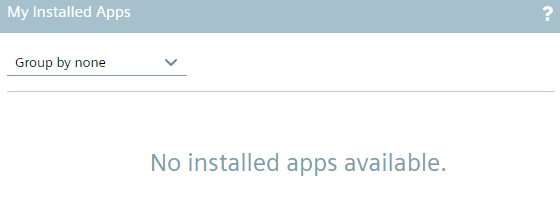
If there are no apps installed yet, the My Installed Apps screen is displayed as follows:
Once you have installed 1 or more apps on an Edge Device, the installed apps are displayed and you can switch between a non-grouping view of the installed apps and a grouped by Edge Devices view.
Grouped by none view
When you select None from the drop-down list, all installed apps are not grouped but just listed and are displayed as follows for example:
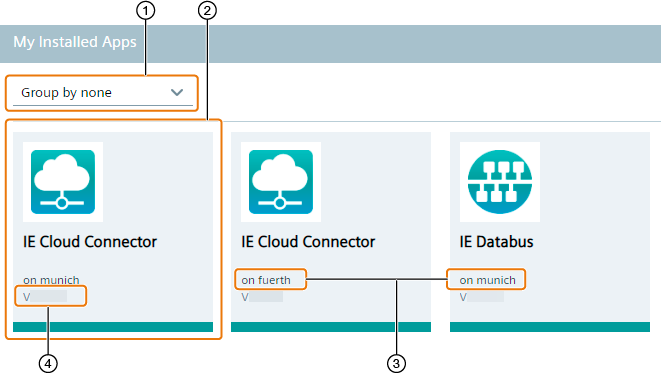
| ① | Switch between grouped by Edge Devices view and grouped by none view |
| ② | Installed app |
| ③ | Edge Device on which the app is installed |
| ④ | App version |
Grouped by Edge Devices view
When you select Device from the drop-down list, the installed apps are grouped by the Edge Devices on which they are installed and are displayed as follows for example:
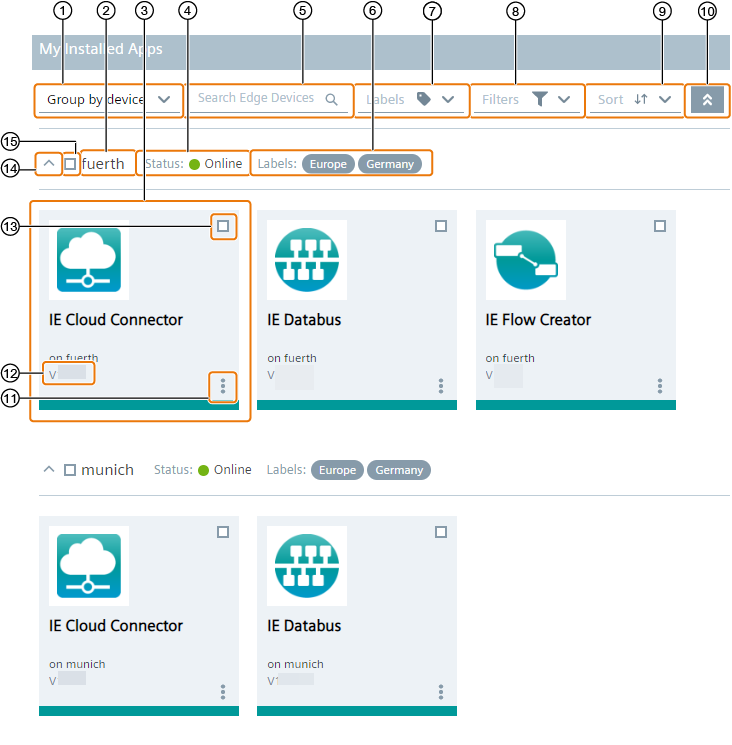
| ① | Switch between grouped by Edge Devices view and grouped by none view |
| ② | Edge Device on which the app is installed |
| ③ | Installed app |
| ④ | Status of the Edge Device |
| ⑤ | Search for Edge Devices |
| ⑥ | Labels assigned to the Edge Device |
| ⑦ | Search for labels assigned to Edge Devices |
| ⑧ | Filter Edge Device view |
| ⑨ | Sort Edge Devices |
| ⑩ | Hide and display all installed apps |
| ⑪ | Check app events and update and delete app configurations |
| ⑫ | App version |
| ⑬ | Select respective app |
| ⑭ | Hide and display all installed apps on the respective Edge Device |
| ⑮ | Select all apps installed on the respective Edge Device |