Job status - Overview
When you, for example, install an app or restart an Edge Device or perform a backup of an IED state, an according job is created and performed in the IEM.
The Job Status screen provides a possibility to check all performed jobs.
Jobs related to apps and Edge Devices are listed under the System tab, jobs regarding backup and restore operations of Edge Devices are listed under the Backups tab.
Each job is displayed in an own row.
At the end of each row, the status of the performed job is displayed, for example whether or not the job execution was successful.
Apps and Edge Devices jobs
Jobs related to apps and Edge Devices are displayed as follows for example:
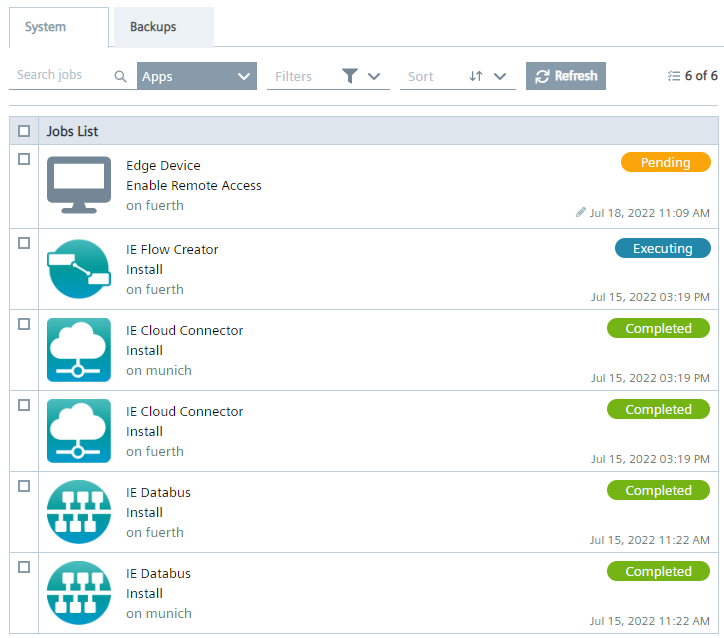
You have the possibility to perform the following:
-
Delete jobs: By selecting 1 or more jobs, the selected jobs are marked and the
 icon is enabled with which you delete the corresponding jobs.
You can also cancel respectively delete pending jobs if the respective jobs have not reached yet the IED respectively if the respective jobs are not displayed yet in the task manager in the Edge Device UI.
icon is enabled with which you delete the corresponding jobs.
You can also cancel respectively delete pending jobs if the respective jobs have not reached yet the IED respectively if the respective jobs are not displayed yet in the task manager in the Edge Device UI. -
Search jobs: By entering keywords in the
Search jobsinput field, you search the jobs for the entered keywords with regard to apps or Edge Devices jobs. To start the job search, press 'Enter' after entering the keywords. -
Filter jobs: With the
 icon you filter the job table regarding job status and several operations.
 -
Sort jobs: Sort the job table with the
 icon.
icon. -
Refresh the jobs table: You refresh the job table by clicking the
 icon.
icon.
Backup and restore jobs
Jobs related to backup and restore operations are displayed as follows for example:
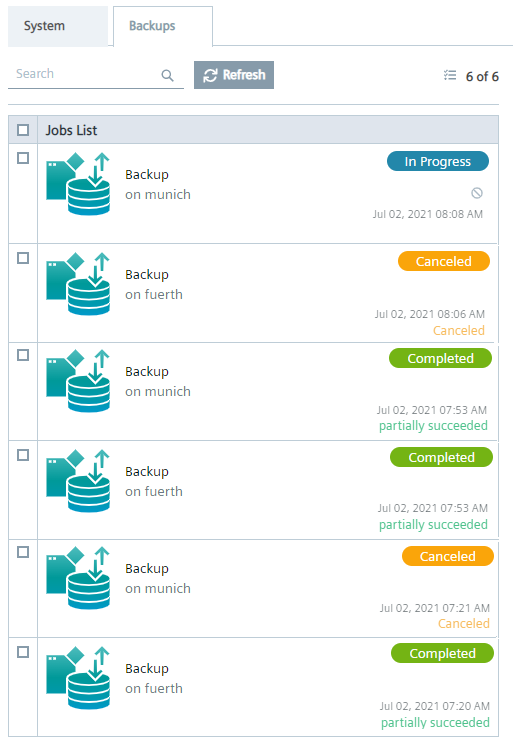
You can also delete backup and restore jobs, search for Edge Devices and refresh the table as described for apps and Edge Devices jobs.
When you perform a backup or restore of an IED state, an according job is created and displayed with the In Progress status.
You can cancel the operation while the job is in In Progress status by clicking the
 icon.
Confirm the cancelation by clicking
icon.
Confirm the cancelation by clicking Stop in the displayed screen.
When you cancel a backup or restore job, the status switches to Canceling.
Until all corresponding jobs are finished, the backup or restore job will be in Canceling status.
Once the job has been canceled, the status displays Canceled.
When the restore job has been canceled, a reset will be triggered to keep the Edge Device in a consistent state.
A partly stored IED state will be deleted completely, a partly restored Edge Device will get reset again.
Not enough disk space for backup data
When storing an IED state of an Edge Device (Edge Device backup), the Something went wrong - please retry error message might occur when the process has failed.
If this error message is displayed, check whether there is still enough free disk space available in the hard disk for storing backup data since this might be the failure reason.
You can check the free and used disk space in the Statistics subsection of the Maintenance UI.
Job status
The following are the possible job status:
| Scope | Job status | Description |
|---|---|---|
| Apps and Devices |  |
The job is submitted |
 |
The execution was skipped | |
 |
The job is processing | |
 |
The execution has failed | |
 |
The execution was successful | |
| Backup and restore |  |
Backup or restore job is in progress |
 |
Backup or restore job is being canceled | |
 |
Backup or restore job has been canceled | |
 |
Backup or restore could not be executed | |
|
The execution was successful |