Install Root Certificate of a private Certificate Authority
Communication between Industrial Edge Devices and Industrial Edge Management is established using Transport Layer Security (TLS). The identity of the Industrial Edge Management is verified using a server certificate. The server certificate can be issued by a public or private certification authority.
To validate the server certificate on the client, the CA's root certificate or intermediate certificates must be known to the IED (chain of trust), so the Industrial Edge Device's onboarding file contains this certificate chain, which is then placed in the IED's trust store. The certificate chain can be replaced by following these steps:
- Edit the configuration
kubectl edit cm portal-ingress-config -n <namespace>. - Encode the certificate chain as base64 e.g.
cat chain.crt | base64 -w 0. - Navigate to the key
portalCertand paste the encoded string. - Restart the Portal Pod
kubectl delete pod portal-service-0 -n <namespace>.
Note Ensure that the certificate file contains the intermediate and the root certificate in the right order: leaf->intermediate->root.
TLS Termination
Industrial Edge supports several ways to expose its endpoints when deployed as a Kubernetes service.
Terminating TLS through building API Gateway
Industrial Edge provides an API gateway that can be exposed directly without a load balancer or ingress controller. It's recommended that you change the default certificate and provide a custom certificate. The gateway certificate can be changed by following these steps:
-
create k8s secret within the same namespace as the deployment.
kubectl create secret -n <namespace> tls kongcert --key <path to key> --cert <path to cert> -
Use the following provision-cli flags to use the secret.
--set kong.env.SSL_CERT=/etc/secrets/kongcert/tls.crt \
--set kong.env.SSL_CERT_KEY=/etc/secrets/kongcert/tls.key \
--set kong.secretVolumes.kong-proxy-tls=kongcert
Terminating TLS through nginx ingress controller
A typical scenario for a K8s installation is to use an ingress controller to control traffic flow to the K8s cluster. This example shows how to replace the default certificate of an nginx ingress controller.
-
Creating a tls secret via kubectl
kubectl create secret tls defaultcert --key <path to key> --cert <path to cert> kubectl edit deployment iem-ingress-nginx-controller -n <namespace> -o yaml -
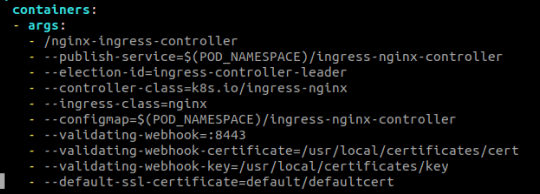
Verify that the nginx ingress controller is using this certificate.
The container args should contain a flag pointing to the proper secret
--default-ssl-certificate=<namespace>/<secret-name>