Introduction to Edge OPC UA Server Application
Edge OPC UA server application runs on Industrial Edge Device (IED) which provides open standard access to data that is available to the customers. Edge OPC UA server connects to the Databus for extracting the data. Any data source which supports Databus common payload format can be modeled in Edge OPC UA server. The application has two parts; Edge OPC UA Server Configurator and Edge OPC UA Server.
Edge OPC UA Server Configurator
Edge OPC UA Server Configurator, is used to configure the Edge OPC UA Server details. Edge OPC UA Server Configurator is used to configure data source, security configuration, and create users, select Data points, Enable Historical access, Model file selection for OPC UA clients to access the server data.
Edge OPC UA Server
The Edge OPC UA Server runs on the IED which is accessed by the OPC UA clients.
Note- A client can connect to Edge OPC UA server at end point
opc.tcp://Ip-Address-of-Edge-Device:48010.
- Once the OPC UA server configurator is launched on an Edge device and successfully loaded, another user will be blocked from launching the OPC UA configurator on the same device at same time.
Any OPC UA client can be used to connect to Edge OPC UA Server as follows UaExpert is used as an example client:
-
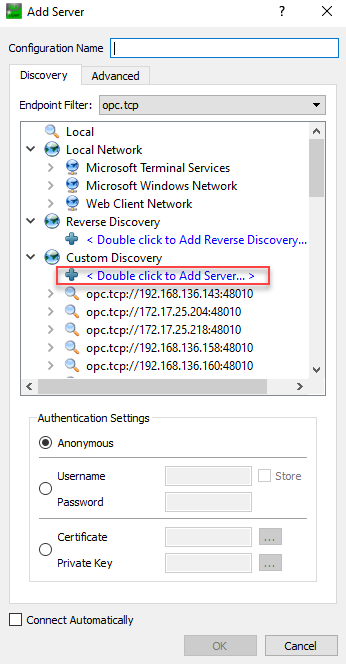
Double click to add the server details in the "Custom Discovery" area.
-
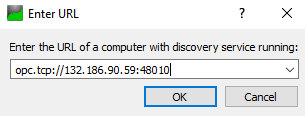
To access OPC UA server application, enter the address of the Edge OPC UA server application/DNS name of IED to identify the specific server instance.
-
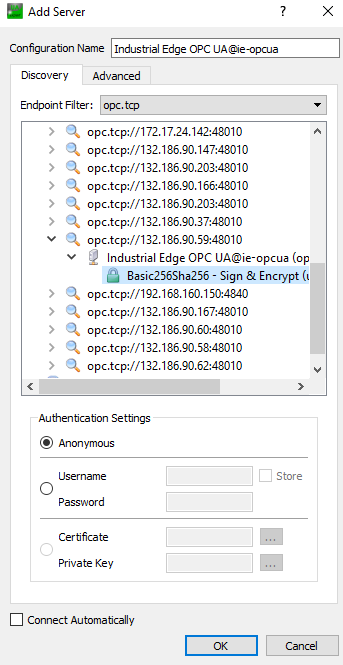
Select the Edge OPC UA server application corresponding to the entered end point.
-
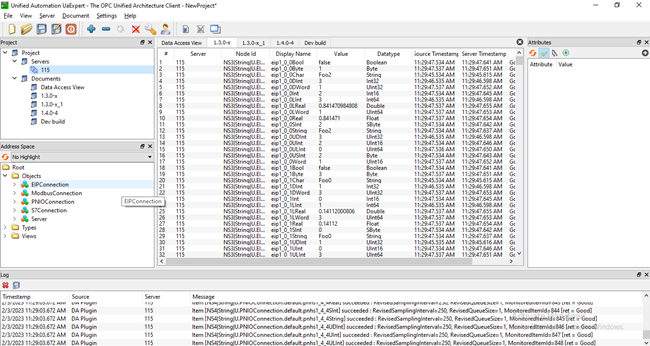
Edge OPC UA Server is added in the client application and now you can access Edge OPC UA Server for visualization of data.
Limitation of Edge OPC UA Server data supports
- Maximum number of data points - 20000 data points
- Maximum number of data sources - 4
- Maximum Number of client connections - 4
- Number of client sessions per connection with values - 4
- Maximum number of monitored Items - 1000
- Minimal sample time - As per the Databus capability
- Maximum number of Data points with Historical access - 800 data points
- Maximum number of Data points mapped with UDNS - 700 data points
- Maximum number of Data points mapped with UDNS and Historical Access- 600 data points
NoteEdge OPC UA Server supports DATA ACCESS (DA) & HISTORICAL DATA ACCESS (HD) as access method.
• The non mandatory fields for server configuration, server Capabilities - aggregate function and operation limits are set to default and should not be referred.