Nodes
This tab will give user the preview of all the nodes deployed to Edge OPC UA server. Nodes will be displayed only for the deployed data points.
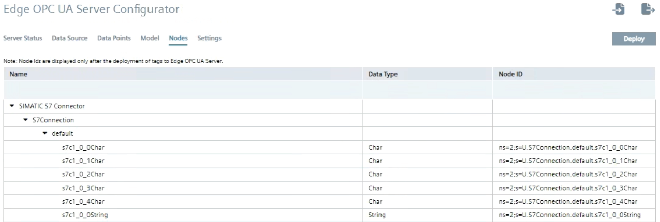
For user defined models, the node ID's of the deployed nodes may vary from the XML after the deployment. This tab allows you to map user defined Models (consisting of data points, structure, variables), which adheres to the OPC UA Model with the existing data points available in the OPC UA server.
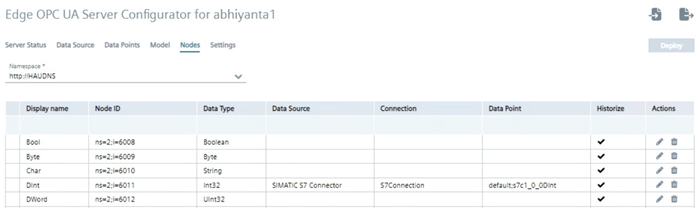
To configure "Nodes" in the OPC UA Server Configurator, perform the following steps:
-
Map the user defined data points with the data points of OPC UA server.
The fields Display name, Node ID, Data Type will get populated from the Model file.
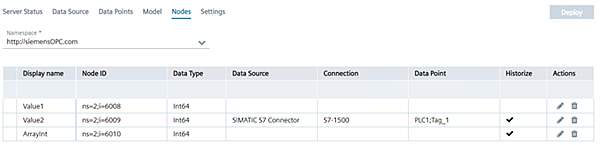
Note - A Model can be associated with multiple namespaces.
- When you uncheck "Use custom information model", you will be allowed to only deploy configurations when atleast one data point is selected. If none is selected then OPC UA configurator displays error. When no datapoints are selected then the "Deploy" tab will be disabled.
- Custom Information Model supports nodes of identifier type "NUMERIC" only.
- In Custom Information Model, Special characters like , " " - are not supported.
- Unmapped variables from the user defined node set will not recieve any value from data source. But in OPC UA client, the variable will be available.
- Based on the selected data type the data points will display all the nodes that can be mapped within the selected data type. -
Click
 to map the data points in the model file with data points in the OPC UA server. "Data Point" column will list down all the data points with similar data types.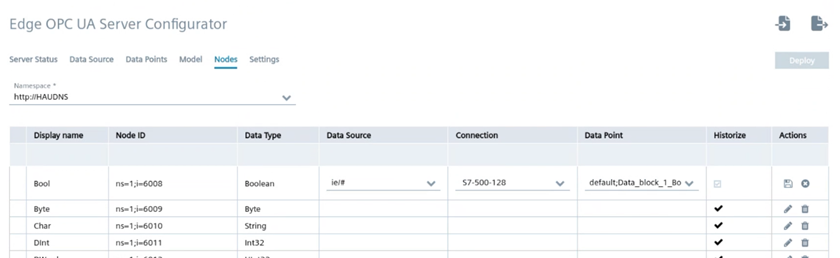
Note- If Historize option is already enabled from the XML then you will not be able to disable it from the web application, but if the Historize option is left blank then you can enable or disable it from the web application.
- If you edit the data and click icon, the edited data is erased and old data is retained.
- If you edit the data and click icon to save the changes.
 -
Click "Deploy".
The Model details are deployed in the OPC UA server, and can be accessed by the OPC UA clients.
You can also deploy without mapping the user defined variables but only the model file. In such cases, no data will be shown.
Note You can also have the preview of the data points deployed with the node ids assigned to themby Edge OPC UA server. Initially Node ID i.e NameSpace ID be default will be 1.