Log in and sign out
Requirement
-
You have purchased the Industrial Edge Hub access.
-
You have successfully signed up to the Industrial Edge Hub.
Log in
-
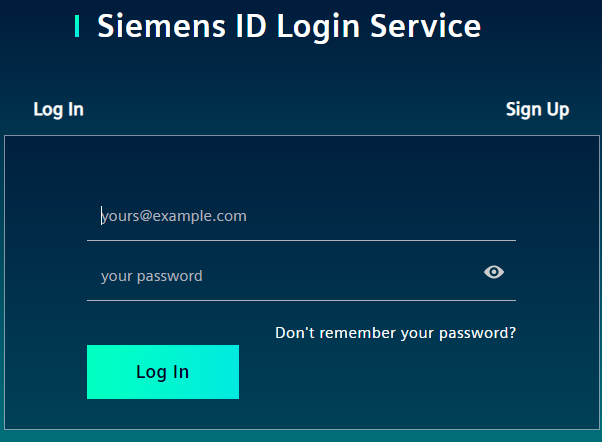
Open the IE Hub by entering the URL into an Internet browser. The login screen is displayed.
-
In the
Loginscreen, enter your email address and your password in the according input fields. -
Click
Log in. TheOrganization Selectionscreen is displayed.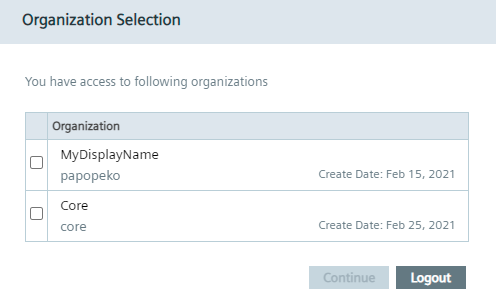 You have the possibility, to be registered in several IE Hub organizations.
If you are registered in several IE Hub organizations, these IE Hub organizations are displayed in this screen.
All resources, registered users, available licenses and assigned apps are only valid in the specific IE Hub organization you log into.
The IE Hub organization name is generated automatically by the system without any meaning or semantics and cannot be changed.
The display name can be renamed under
You have the possibility, to be registered in several IE Hub organizations.
If you are registered in several IE Hub organizations, these IE Hub organizations are displayed in this screen.
All resources, registered users, available licenses and assigned apps are only valid in the specific IE Hub organization you log into.
The IE Hub organization name is generated automatically by the system without any meaning or semantics and cannot be changed.
The display name can be renamed under Organization Settingsonce you are logged into the IE Hub. If you are registered in just 1 IE Hub organization, the IE Hub organization will open directly without the selection of an IE Hub organization. -
Select the check box of the IE Hub organization you want to log into.
-
Click
Continue. TheConfirmation of delivery address and Export Control Clausescreen is displayed.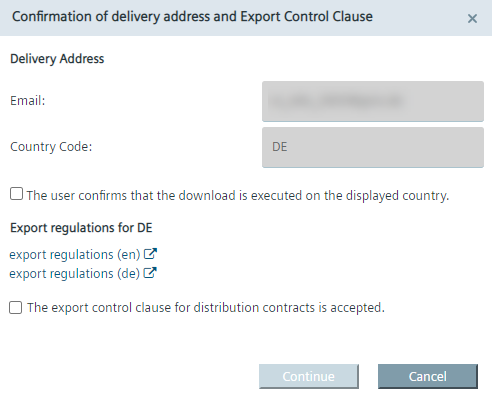 The available export regulations in the screen depend on your location, here for example Germany.
 -
Before entering the IE Hub, you must read the export regulations.
-
Accept the export regulations by selecting the 2 check boxes. The acceptance will be logged in the IE Hub database along with the date of acceptance.#
-
When both check boxes are selected, click
Continue. The home page of the IE Hub is displayed.Note IE Hub URL The IE Hub URL adapts to the generated IE Hub organization name. For example, when the organization name is
core, the URL will behttps://core.iehub.eu1.edge.siemens.cloud. You can directly log into specific IE Hub organizations by using the respective URL.
No access to the Industrial Edge Hub
If you try to sign into the Industrial Edge Hub without having purchased access to the Industrial Edge Hub, the following screen is displayed:
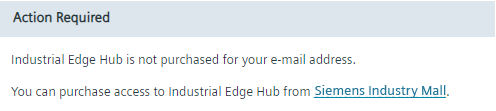
Purchase access to the Industrial Edge Hub in the Siemens Industry Mall by clicking the link.
Sign out
-
Click the user icon in the top right corner.
-
Click
Logout.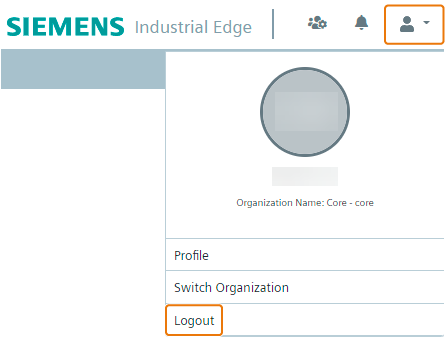
You are signed out from the IE Hub.