App details
When you click the tile of an app, the app details are displayed as follows for example:
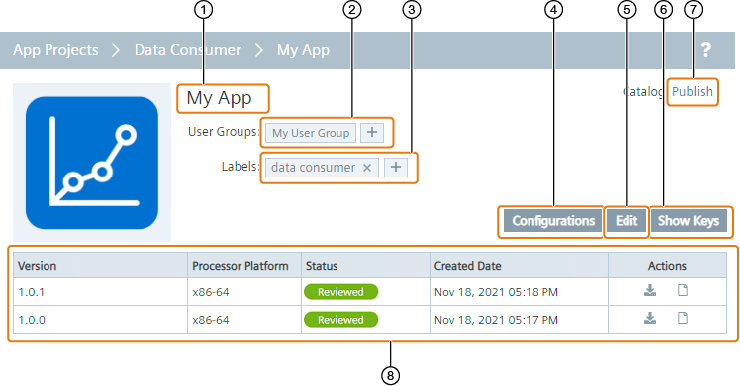
| ① |
App name |
| ② |
User groups:
- User groups in which the app is assigned to.
- Assign app to other existing user groups.
|
| ③ |
Labels:
- Assigned labels.
- Remove labels from the app.
- Create and assign new labels to the app.
|
| ④ |
Add and manage app configurations |
| ⑤ |
Edit app |
| ⑥ |
Display app ID and secret keys |
| ⑦ |
Publish app versions to the catalog in the Management UI |
| ⑧ |
Version table with following information:
- Version: Published versions of the app from the IE App Publisher to the IEM
- Processor Platform: Platform of the published versions
- Status: Status of app versions
- Created Date: Date and time of uploaded app versions
- Actions:
 : Install app version : Install app version : Remove app version from the catalog in the Management UI, if previously published via ⑦ : Remove app version from the catalog in the Management UI, if previously published via ⑦ : Check Docker-compose file : Check Docker-compose file
|