Purchased licenses
The Purchases tab lists all licenses and subscriptions of your purchased products. The tab is divided into the Industry Mall and the Industrial Edge Marketplace section.
The Industry Mall section lists all purchased licenses. The following figure shows the Industry Mall section as an example:
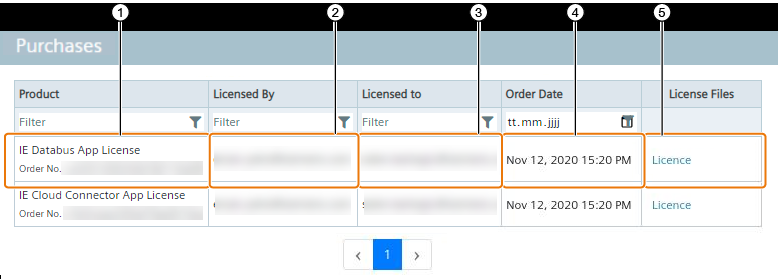
| ① | Product name and order number (MLFB) |
| ② | Purchaser email address |
| ③ | Customer email address |
| ④ | Date of order |
| ⑤ | Download license file |
The Industrial Edge Marketplace section lists all subscriptions that you ordered from the IE Marketplace. The following figure shows the Industrial Edge Marketplace section as an example:
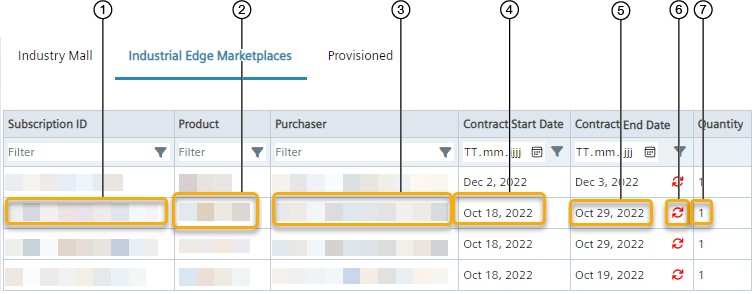
| ① | Subscription ID |
| ② | Product name |
| ③ | Email address of the purchaser |
| ④ | Subscription start |
| ⑤ | Subscription end |
| ⑥ | Auto-renewal status |
| ⑦ | Number of subscriptions |
The auto-renewal status indicates whether the product license that is about to expire will be automatically renewed or not when the subscription end is reached.
Product licenses that are marked with the
 icon will not be automatically renewed when the subscription end is reached and will not be available anymore after subscription end.
Product licenses that are marked with the
icon will not be automatically renewed when the subscription end is reached and will not be available anymore after subscription end.
Product licenses that are marked with the
 icon will be automatically renewed when the subscription end is reached.
In both cases, if you want to change the auto-renewal status, contact the product purchaser.
icon will be automatically renewed when the subscription end is reached.
In both cases, if you want to change the auto-renewal status, contact the product purchaser.