Download the IE App Publisher
Procedure
-
Open the Industrial Edge Hub.
-
Click in the navigation field on the
Download Softwaremodule. -
Click on the
Developer Toolstab.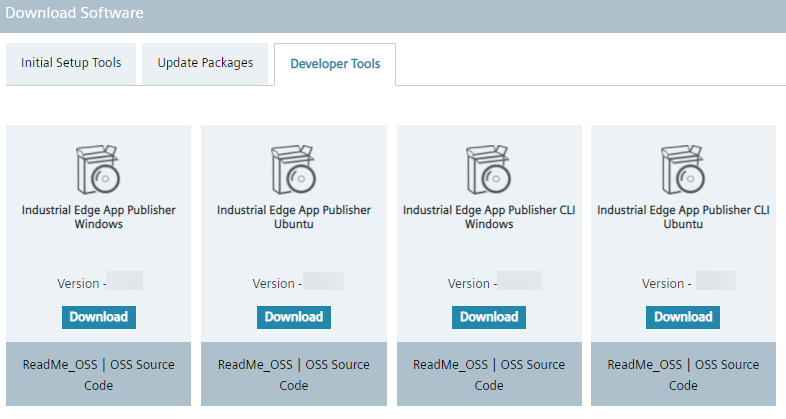
-
To download the IE App Publisher click on one of the following
Downloadbuttons:- For Windows with UI (User Interface), click on the
Downloadbutton underIndustrial Edge App Publisher Windows. - For Windows with CLI (Command Line Interface), click on the
Downloadbutton underIndustrial Edge App Publisher CLI Windows. - For Linux with UI (User Interface), click on the
Downloadbutton underIndustrial Edge App Publisher Ubuntu. - For Linux with CLI (Command Line Interface), click on the
Downloadbutton underIndustrial Edge App Publisher CLI Ubuntu.
Your browser downloads a file with the format
.msifor Windows or.debfor Ubuntu. This file is the installer for the IE App Publisher. - For Windows with UI (User Interface), click on the
Note Help for the CLI versions To show help about commands in the CLI, enter following command in the command line: ie-app-publisher -h or ie-app-publisher --help
Note
IE App Publisher on Windows gets detected as virus / trojan
If you are using the Industrial Edge App Publisher on Windows, your antivirus software may treat it as threat or trojan (This is a false positive in Windows Defender) Issue that might occur:Or
Or
To resolve this issue, follow the steps below.
- You can use the older version of Industrial Edge Publisher
- Workaround, for now, is as follows:
- Go to Windows security
- Go to Protection History
- Check for the latest detected threat. [ Here Publisher.exe is marked as a trojan due to the latest system update.]
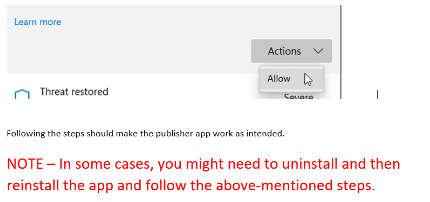
- Under the Actions button click on Allow/Restore