In the initial phase, all the information or files required for the actual execution of the later tests are collected.
In order to be published on the marketplace, it is necessary to provide all the information requested.
In order for us to begin our review process, the App Partner must provide an application file that has been signed by Industrial Edge Hub. We will reject any applications that are not signed by Industrial Edge Hub.
Exception Condition
Upcoming feature: The application is delivered via the Industrial Edge Hub "Ecosystem Testing" - functionality of the "Application Management".
Failed condition
The provided application is not signed by the Industrial Edge Hub. No further testing is performed.
Also see
Visit the Application Management page to learn how to sign your application using the Industrial Edge Hub.
Procedure
Steps
Action
Expected Result
1.
Import the application-file provided by the app developer into the Catalog of your Industrial Edge Management.
2.
Wait for the upload to finish.
3.
Navigate to the Catalog and click the icon of the imported application.
4.
If the application displays a green shield , the application is signed by the Industrial Edge Hub and the check is passed.
Information about the network connections of an application is necessary to test and use the application, for example remote server login. To prevent the application test from being blocked by a firewall, the tester and user need to know domain addresses and application ports. The Hardware Requirements document must contain this information.
Failed condition
The ports and the domain that are used by the application are not listed in the "Hardware Requirements" document.
Note:
At least one port should be on the list, otherwise the application is of no value to the customer.
Procedure
Steps
Action
Expected Result
1.
Check that the app developer provided a "Hardware Demands"-document.
2.
Verification of his port/domain record information.
Documentation must be made available from the application developer to the tester and user. The best place to provide documentation is via the Industrial Edge Hub.
Exception Condition
The Ecosystem Manager will need to provide us with the documentation via our 3rd Party Testing Teams channel or for internal apps the teams folder ***\App Onboarding Round\SDEX Onboarding until the Super Tester role is provided by the Industrial Edge Hub team.
Failed condition
No documentation is provided by the App Developer to the Tester and/or the end-user.
Procedure
Steps
Action
Expected Result
1.
Log in to your tenant in the prod Industrial Edge Hub (for the tester, this should be the "Testing Tenant").
2.
Go to the Library tab.
3.
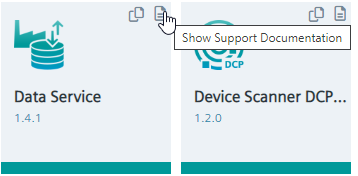
Click the 'View Support Documents' icon for the application.
4.
Veryfiy that you are being directed to the correct documentation.
The Ecosystem Manager must provide this information/file to the Sharepoint folder if the application requires any kind of access (account on the company server) or a specific license file to activate the application.
Failed condition
The test team is not provided with any login/license files required to run the application.
Only released versions are offered on the SDEX market, so we only accept release candidates for testing. Our system does not work with downgrading applications. Therefore, we need to ensure that the new version of the application deployed is higher than the last version deployed. Also, the application must be approved by our Publisher and Industrial Edge Hub according to the policy defined at https://semver.org/.
Supported Edge devices listed in Hardware Requirements
Test Title
Supported Edge devices listed in Hardware Requirements
Test Category
Mandatory before testing
Description
We expect the application developer to have tested their application on all edge devices they support before we begin our testing. We need a list of all supported edge devices in the "Hardware Requirements" documentation.
Failed condition
If the "Hardware Requirements" documentation in SDEX does not list a device as a supported edge device.
Customers must be able to contact a support team from the company that created the application if a problem occurs. A clear support policy needs to be provided by the application developer.
Failed condition
No support contact was provided to Siemens.
Note:
For internal applications, please check the link with its individual entry.
The documentation must describe the data retention policy. Since storage space in the IED is limited, an automatic deletion mechanism is required if there is a persistent database within the application.
Failed condition
The documentation does not specify a data retention policy.
There are apps that work better together and open up additional functionality when combined with other apps. In order to make sure that this is transparent to the user, we need to check that this information is displayed in the prerequisites section of the front store onboarding and in the commercial onboarding sheet.
Failed condition
In case there is no information available on the applications on the SDEX market.
For internal testing purposes (e.g. NFR Testing) and sales enablement it is important to have detailed information about the application value proposition, use case, customer and proposed delivery.
Note
The Ecosystem Manager should carefully review the information requested in the App Collaborator Use Case document* with the App Collaborator. The document can be shared with the provider. Additional guidance sessions for clarification may be helpful.
The Use Case Document can be downloaded here:
Use Case Document Template
For an efficient testing of your application please provide all necessary input data for a demo project such as: Mock or sample data in Common Payload Format Sample configuration User Account App binary Exectuable models ... et cetera
 , the application is signed by the Industrial Edge Hub and the check is passed.