Frequently asked questions (FAQ)
The segment frequently asked questions will collect and answer often asked questions regarding the Industrial EDGE Ecosystem & Platform
Develop an App
Q: Is Industrial EDGE free?
Answer
You can get started with an Industrial Edge account for €0, download the development tools and set up a local Industrial Edge Management instance on your local hardware.
Q: How do I get started with Industrial EDGE?
Answer
To access the Industrial EDGE Hub, you will need to purchase Industrial EDGE Hub Access for 0€ from the Industrial Edge Marketplace. From there you can download the development tools and IEM management software. For detailed information this documentation is a good start.
???+ Hint "China Region"
For users in China region please purchase Industrial EDGE Hub Access from the Industrial Edge Marketplace China.
Q: What is the difference between the Industry Mall and the Industrial Edge Marketplace?
Answer
The Industry Mall is our established place to buy hardware products, whereas the Industrial Edge Marketplace is Siemens' software marketplace with tailored capabilities for SaaS and subscription services.
China Region
For users in China region please access Industrial Edge Marketplace China to purchase Industrial Edge products.
Q: Can I use my Docker applications on Industrial EDGE?
Answer
Yes, Industrial Edge uses Docker technology and your Dockerised application is basically ready to run on Industrial Edge. However, it makes sense to check the Industrial Edge App Review Guidelines and test compatibility on standard devices such as IPC 227e or the virtual edge device.
Q: Which Industrial EDGE development stages should I use?
Answer
Industrial Edge provides several stages for different purposes:
- Ecosystem-PROD Stage is used for testing purposes and compatibility checks with new Industrial EDGE versions.
- PROD Stage is used to publish your production application.
China Region
Ecosystem-PROD Stage is not available for China currently. Only PROD Stage China is available for China region.
Q: Are there design guidelines for Industrial EDGE?
Answer
Industrial EDGE provides design guidelines with elements that are open source and can therefore be used internally and externally.
Q: Can I use my existing Industry Mall account for the Marketplace?
Answer
Yes, select "sign in with Industry Mall Account"
Q: What payment types and cycles does the Industrial EDGE ecosystem offer?
Answer
Industrial Edge app types & licensing models are still under development and expansion. Currently, Industrial Edge only offers a 1-year prepaid subscription for Free or Professional Applications (see for more details App types & Licenses). This means that a customer pays their annual subscription for one year in advance. Contracts can only be cancelled once a year.
Q: What happens when I upload my application file to the IE Hub?
Answer
A virus scan is performed automatically. A signature is applied to your app when you switch from created to Private Release status.
Q: What is the difference in the IEM between an App Project and Catalog Apps?
Answer
App Projects are user-specific, whereas Catalog Apps are visible to all users on that IEM. App Projects are used when you only want specific users to use your app.
Q: What is the Ecosystem Review and what are the consequences if my application is not compliant?
Answer
The Ecosystem Review provides minimum testing guidelines that do not replace proper testing of your application but should prevent common pitfalls. In addition, the Ecosystem Review gathers information that can be used to qualify your app for the Marketplace. Detailed information on the App Review process is available in the Ecosystem Review. If you submit an incomplete App Review ticket, your application will not be published until the App Review process has been successfully completed. Feedback on the review will be provided as soon as possible.
Publish an App
Q: What do I need to consider when multiple people are working with the App Publisher?
Answer
If multiple people are working with their installations of the Publisher, your application may have different AppIDs during the publishing process, which would result in a mismatch of AppIDs. It is therefore possible to retrieve your AppID first, e.g., using a browser, and then set your AppID individually in the IECTL.
Q: Your version activation request for the application: "XXX" version: "1.X.0" was rejected by the system?
Answer
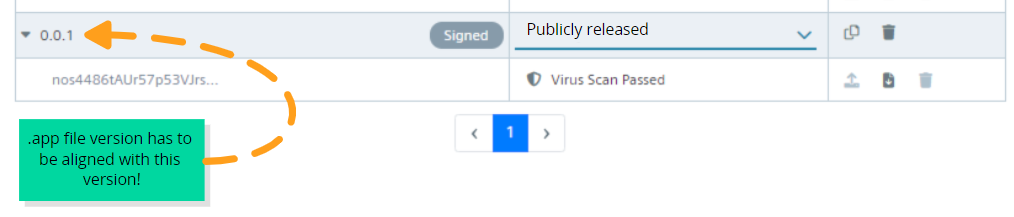
The version number of the requested activation does not match the uploaded application file (.app) details. Please contact info@edge.siemens.cloud for the details. The .app file generated must be the same as the version in IEHub (1.3.0), if these two do not match, the application will be rejected.
Q: What files are expected as OSS source and OSS readme?
Answer
Open-Source Software Sources are the files of all included components. The OSS Readme contains the open-source software licenses.
Q: What is the difference in the Publisher between standalone apps and app projects?
Answer
App Projects are linked/mirrored to a project in the Management System. Standalone Apps are IEM independent and are only stored on the local workspace.
Q: What roles do I need to publish an app?
Answer
Your organization needs to be registered so that your application can be successfully signed, and you need to have an App Seller role so that you can configure your app binary with your Marketplace listing.
Q: My app is in the Ready to Marketplace state, what do I do next?
Answer
Contact your local Ecosystem Manager to obtain your App Seller Role. Once you have received your App Seller Role, you will be able to configure your app in the App Seller tab of the Marketplace with your unique Marketplace URL and the SKUID you defined during commercial onboarding.
Q: What are the different statuses for publishing and applying?
Answer
| Status | Description |
|---|---|
| Created | When a version is created, the status is Created. |
| Privately released | An .app file must be uploaded. This is activated and signed (by Application Signing Service) after passing a virus scan. |
| App review | The app is in the Ecosystem App Review, which requires uploading your individual test report and providing all files necessary for the test team to test your application. |
| Public release | To set the status to "Ready to sell", the version must be publicly released. After this, it is not possible to delete the version. |
| Ready for Marketplace | When you click Ready for Marketplace, your documentation URL and app logo, as well as at least one app version, must be publicly released. Your completed tasks in the App Management tab. |
| Pending Approval | This requires that you have registered your product in Marketplace, you have received the product ID as a marketplace identifier and the app is in Ready for Marketplace. |
| In the Marketplace | The app is in the Industrial Edge Marketplace and available for purchase by consumers. |
Q: What is private and public?
Answer
Privately released: Your local IEM member, e.g., your team, can see and use the application. Publicly released: Publishing the first version of a new application. You have technically released the app, but so far, no customer or user can see your app as it is not yet configured for the Marketplace.
Publish a successor version of an existing app. You have technically published a new version of your app and customers and users will be notified that you have published a new version.
Q: What happens when I update my app on the IED?
Answer
When an application is updated, the container is stopped and restarted. This may also affect your volumes - depending on the volume type (e.g., TMPFS is affected).
Q: Where can I find out what is important to know for the App Review?
Answer
Q: Against which Industrial Edge device version(s) do I need to test to ensure compatibility?
Answer
You test against the latest version and a previous version. (n-1) e.g. 1.1.1 & 1.1.0
Q: How often are new Firmware versions of Industrial Edge devices (IED) released?
Answer
IED firmware updates are provided on a 3 month period for most devices.
Q: What is required of an Industrial Edge App Partner to ensure compatibility with new device firmware versions?
Answer
App Partners have 6 months to test and release a new version against the latest Industrial Edge device firmware (N-1)
Q: Which device should I use as a reference for compatibility testing?
Answer
We recommend testing against the IPC227E and the Industrial Edge virtual device.