Functional qualities, also known as functional requirements, describe the specific features, capabilities, and functions that the system or software must perform to satisfy the user's needs and requirements.
They define the "what" of the system, focusing on its behavior and functionality from the user's perspective.
Examples of functional qualities include user authentication, data validation, report generation, search functionality, and transaction processing.
Functional qualities are typically specified in terms of specific features, use cases, and user interactions that the system should support.
Application runs on at least 2 Industrial Edge device versions
Test Title
Application runs on at least 2 Industrial Edge device versions
Test Category
Release blocking check
Description
Application runs on the latest (n) and previous (n-1) Industrial Edge device firmware. The hardware requirements documentation provided by the application developer specifies the device type.
Exception Condition
Because this version of the Industrial Edge device does not provide all of the required functionality for the application to run without restrictions, the application will not run on the (n-1) version. However, the application must run on the latest (n) version of the Industrial Edge device and this must be specified in the hardware requirements documentation.
Failed condition
The application does not work as expected on one of these Industrial Edge device versions.
Procedure
Steps
Action
Expected Result
1.
Install the application on a device with the latest Industrial Edge device version.
2.
Install the application on a device with a previous (n-1) Industrial Edge device version.
3.
On both Industrial Edge device versions, verify that the application runs with a minimal use case.
All applications behave the same way. No direct version dependency can be detected.
Application can be updated from the latest version provided
Test Title
Application can be updated from the latest version provided
Test Category
Release blocking check
Description
An application must continue to run after an upgrade from a previous version without loss of data or user input.
Warning Condition
During the update, some data is lost.
Failed condition
After the update, the application fails to run or all of its configuration/data is lost.
Procedure
Steps
Action
Expected Result
1.
Install the (n - 1) version of the application on your device.
2.
Set up a minimal use case,for example via configs/data.
3.
Update the application to the latest (currently tested) version via the Industrial Edge Management.
4.
Verify that the application is still running with the previous configuration and that there has been no loss of data.
All stored data is available and the application is still running. If necessary, stored data will be converted to a new format.
The n-1 and n Industrial Edge device versions can run the application. After updating the device to the latest version, the application should run without loss of data or user input.
Exception Condition
- The application does not support the n-1 version of the device, due to missing functionality in the device software. - Some incompatible change to the device software were made, so the application developer is not capable of handling these in a reasonable manner.
Warning Condition
Some Data is lost during update.
Failed condition
The application does not run after the update, or all its configuration/data is lost.
Procedure
Steps
Action
Expected Result
1.
Install the application on a n-1 Industrial Edge device version.
2.
Setup a minimal usecase of the application.
3.
Update this Industrial Edge device to the latest (n) version.
4.
Verify that the application is still running with the previous configuration and that no data has been lost.
We need to prepare all components to be scalable in order to create an ecosystem that can scale over time. This is why we have adopted the "12-factor" strategy. In case of a failure in the underlying layers, the processes should also be robust against sudden death.
Exception Condition
We will investigate violations of this policy on a case-by-case basis. We reserve the right to waive this test if the application developer can explain to us why it is necessary for their application, for example, to prevent a container from restarting on an internal error.
Failed condition
Some of the application services have a restart policy set to "NO". This means that the application will not restart after a device reboot or after a failure, and therefore does not comply with the "12-Factor" strategy.
Procedure
Steps
Action
Expected Result
1.
Check the application's docker-compose.yml.
2.
Check the restart policy for each container.
3.
The restart policy of each container should be "unless stopped", "on failure" or "always".
4.
Install the application on your device with a minimal setup. Reboot the device.
5.
After rebooting the device, the application should start automatically.
6.
The application should restart without any loss of data.
Non-functional qualities, also known as non-functional requirements or quality attributes, describe the overall characteristics, properties, and behaviors of the system or software that affect its performance, reliability, usability, security, and other aspects.
They define the "how" of the system, focusing on its qualities and attributes rather than its specific features or functions.
Examples of non-functional qualities include performance, reliability, usability, security, scalability, maintainability, portability, and interoperability.
Non-functional qualities are typically specified in terms of constraints, thresholds, and metrics that the system must meet to be considered acceptable from a quality perspective.
The application should be able to run without a configuration. Therefore, the application is not allowed to die in this scenario, but instead should notify the user to provide a configuration. This must be done via the application's Web UI. If the application does not provide a Web UI, the application must provide this information instead through its logs instead.
Warning Condition
The application requests a configuration but does not provide a config template.
Failed condition
- The application's Web UI does not notify the customer that a configuration file must be provided. - If the application does not provide a Web UI and the logs do not include information about the missing configuration.
Procedure
Steps
Action
Expected Result
1.
Install the application on a device without any configuration chosen.
2.
Check that the app is running and not shutting down.
3.
Check the application's Web-UI/Logs.
4.
By these you should be informed, that you must provide a configuration.
Administration and configuration is not done by an extra process or tool, it should be part of the normal IE environment. All tools, for example configurators, are released and bundled with the application. This enables in place data migration and configuration. https://12factor.net/admin-processes
Exception Condition
Currently the IEM-Configurators are not bundled with the application and therefore cannot be released as a single entity.
Warning Condition
The application can be configured by configuration files, for which it is necessary to start additional software (not hosted on IE platform).
Failed condition
To change the configuration of the application it is necessary to start additional software (not hosted on IE platform) and the configuration can not be changed via the IEM.
Procedure
Steps
Action
Expected Result
1.
Install the application on a device.
2.
Start the app and set up a minimal usecase via configuration.
If an application offers a web interface for the user by one of its containers, the Redirect URL of the application must point to this service, so that the user can click the application icon on the device to get redirected to the web interface.
Exception Condition
Any service with a web UI is provided (for example server applications / database / ...).
Failed condition
The application has a web UI service, but the Redirect URL points to the wrong container or no Redirect URL is set.
Procedure
Steps
Action
Expected Result
1.
Install the Application on a device.
2.
Navigate to the "Apps" view on the device.
3.
Click the icon of the application.
4.
Verify that you are redirected to the application's Web UI.
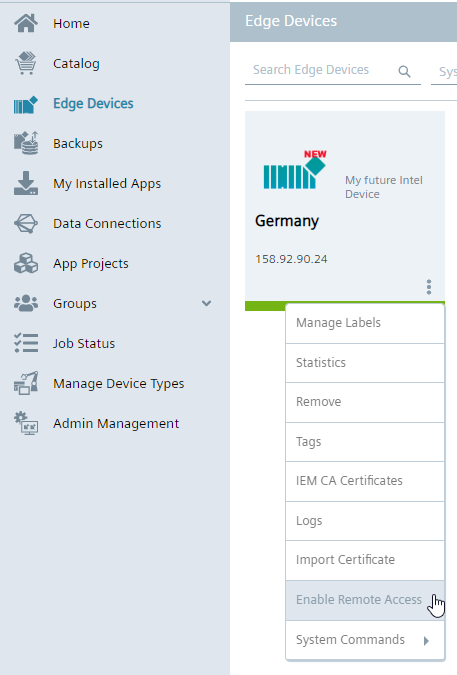
Our IEM has a feature called "Remote Access" that allows you to access the IED through your connection to the IEM. It works like a VPN tunnel through the IEM and the device establishes the connection to the IEM (southbound to northbound). Many customers only access their device using this functionality, so to give the customer the full experience, the application should be able to support this.
Exception Condition
The application does not provide a Web UI at all. Therefore, it is not accessible via Remote Access.
Failed condition
The application UI can not be accessed via the "Remote Access" of the IEM.
Procedure
Steps
Action
Expected Result
1.
If your IEM does not has a "Relay Server" configured, create it for your IEM in the "Admin Management".
2.
Enable the remote access for the Edge device\n
3.
Install the application to the device where the remote access has been enabled.
4.
Left click on the device in the "Edge Devices" view of the IEM.
Info: When using the backup and restore functionality in the IEM, we stop the applications on the device Regarding the backup of volumes, the system currently supports only specific application volume types. Please refer to the user manual for more information..
Failed condition
The app does not start with persistent configurations or user data.
Procedure
Steps
Action
Expected Result
1.
Install the app on a device.
2.
Go to IEM > Edge Devices.
3.
Execute a backup of the device via the system command button. Include the backup of app volumes via checkbox.
4.
Uninstall the application from the device.
5.
Execute a restore of the device in the "Backups" tab in your IEM.
6.
Check, if the app is providing the same configuration and user data as before.
To scale the deployment of the application, we also check the user experience for its mass installation. For this, we try to reproduce the deployment of the application on multiple devices within 5 clicks.
Warning Condition
If the app is able to be mass deployed, but the installation and configuration takes more than 5 clicks.
Failed condition
No mass deployment is possible as the configuration of the use case is too complicated.
Procedure
Steps
Action
Expected Result
1.
Log in to an IEM with more than one onboarded device.
2.
Select multiple IEDs for installation.
3.
Check, if the app installation with configurations can be executed with maximum 5 clicks.
An ecosystem control point typically refers to a specific juncture or component within a complex system or ecosystem where control or management actions can be applied to influence the behavior, performance, or outcome of the system as a whole. This concept is often used in the context of environmental management, ecological systems, or complex technological ecosystems.
Overall, the concept of an ecosystem control point emphasizes the strategic identification and targeting of key leverage points within complex systems or ecosystems to achieve desired outcomes, whether it be environmental conservation, system optimization, or risk management.
Only released versions are offered on the SDEX market, so we only accept release candidates for testing. Our system does not work with downgrading applications. Therefore, we need to ensure that the new version of the application deployed is higher than the last version deployed. Also, the application must be approved by our Publisher and Industrial Edge Hub according to the policy defined at https://semver.org/.
Containers can address each other by using their service name. Since all applications are connected to the same network by default, if all database containers in each application are just called "Database", this could cause some problems when addressing a specific container. The service name must be unique. We have defined a nomenclature to ensure this: "application name""-""service name"
The exception condition is met if the application has defined a network and the network type is set to INTERNAL. This is an exception because the application will be on a network that cannot be accessed or addressed by other containers. Therefore the naming is irrelevant.
ALL CONTAINERS MUST CONNECT TO THE INTERNAL NETWORK
If the application service names do not match, but are unique enough that they are unlikely to exist in different applications, then the warning condition is met.
App specific URL subdirectiry path (aka. Revers Proxy name) are set by the application builder per service. These naming need to be unique upon one device, otherwise the application installation would fail. Best practive is to use your service name as the App specific URL subdirectiry path
Here is an example that would pass that test.
The Application name is: My very special application
Service 1 Name: My-very-special-application-Web-UI"*
The exception condition is met if the application provide supplies twise the exact same nginx configuration name, in the scope of preventing these apps to run on the same device at the same time.
If the application nginx configuration names do not match, but are unique enough that they are unlikely to exist in different applications, then the warning condition is met.
If two applications have the same repository name, our system will prevent the second application from being installed. This is to ensure the uniqueness of an image. Therefore, a unique repository name is essential. Since the Industrial Edge Hub does not check the uniqueness of the repository name, we need to manually check that it is not already in use. To do this, we should find the application's repo name in the digests.json file and match it against our database. Once this is done, we need to add the repo name to the list.
Failed condition
The repository name is already in use, or has a name that could occur multiple times. The application developer should be notified of this problem so that the repo name can be changed.
Procedure
Steps
Action
Expected Result
1.
Download the .app file.
2.
Open the file with 7zip.
3.
Open the digests.json file.
4.
Locate the part of the file that describes the docker-compose.yml file.
5.
The name in front of "/docker-compose.yml" is the name of the repository.
6.
Check the database. See if the name already exists.
7.
If it does not exist, enter the repository name as a new entry.
The state of the art is to define an image version in docker-compose.yml files to ensure a reproducible combination of containers as an application version.
At least one image is referenced by a non-unique term (e.g. latest) or no version is specified.
Procedure
Steps
Action
Expected Result
1.
Check the docker-compose.yml file.
2.
Verify that all images have their version references.
All parts of an application are referred to by their version number.
Online access for download of additional features
Test Title
Online access for download of additional features
Test Category
Not Release blocking check
Description
As a general rule, all software components must be part of the application at the time of initial deployment. An application must not provide the ability to download additional features.
Warning Condition
The main functionality is provided. Additional software is available for download.
Failed condition
After installation of the application in an offline case, the main functionality is not available.
Procedure
Steps
Action
Expected Result
1.
Installation of the application on a device that does not have an Internet connection.
2.
Use the application with minimum setup.
3.
Analyze the traffic generated.
Offline and online applications offer the same functionality.
Services that use a standard protocol must use the standard port that is designated for that purpose by IANA. Unassigned user ports or the private port range (49152-65535) must be used for non-standard protocols.
Warning Condition
Standard protocol does not use its standard port.
Failed condition
on-standard protocol does use an incorrect port (definition above). Protocol uses an IE system reserved port (80 / 443).
Ecosystem scalability pertains to the ability of a digital ecosystem to grow, adapt, and handle increased demands without compromising its functionality or performance.
It involves expanding the ecosystem while maintaining its efficiency, responsiveness, and value to customers.
Scalability ensures that the ecosystem can accommodate more users, services, and interconnected products as it evolves.
Industrial Edge devices communicate using network protocols. Therefore, all services must make data transparent to other applications over IP-based networks. Services are addressed by a combination of device service name/IP address and port. All services should be accessible through a URL.
Failed Condition
Other constructs such as sockets, files, etc. are used for inter-application communication.
Procedure
Steps
Action
Expected Result
1.
Install the application on a device.
Result you expect.
2.
Set up the minimal use case of the application.
Result you expect.
3.
Install a network diagnostics tool.
Result you expect.
4.
Monitor traffic of the application.
5.
Check the reachability of its subcomponents, for example via telnet.
All the services communicate via ports and are bound to them.
Each application is self-contained (front-end, framework, microservice A+B+C) in combination with platform components. An app must deliver customer value without relying on other apps, according to the ecosystem framework. Apps must be able to work out of the box without any dependencies.
Exception Condition
Depending onto Platform Components. These are: - IE-Databus - Industrial Information Hub Core - Runtime
Warning Condition
It is designed to work with a subset of functions that could be expanded by combining it with other applications.
Failed condition
Without the installation of additional applications, the main functionality of the application will not work.
Procedure
Steps
Action
Expected Result
1.
Install the application on a device that does not have any other applications installed.
Some applications need more resources than others and some devices offer more resources than others, so how can you define the maximum resources an application can use/allocate? We, as the Ecosystem of Industrial Edge, have defined that in order to pass this test, your application must be installed on a device, as well as IE-Databus, S7-Connector & Cloud Connector.
Warning Condition
The application cannot be installed on the device alongside Databus, S7-Connector & Cloud Connector due to insufficient resources.
Failed condition
The application cannot be installed next to the Databus on the device due to insufficient resources.
The application must make data available to other applications via the Databus if the application collects/generates data from external peripherals (in the sense of a connector). This function can be disabled by the user of the application. For example, to minimize databus traffic. However, it is important that data is written to the databus with the application's default setting.
This is a guarantee for interoperability between all applications on the Industrial Edge.
Exception Condition
The application has passed this check if it does not collect/generate data from external peripherals.
Warning Condition
The data is not sent in the Common Payload Format.
Failed condition
The application collects/generates data from external peripherals and not all relevant data is published to the Databus by default.
Procedure
Steps
Action
Expected Result
1.
Install the Databus on a device.
2.
Install the application on the device (with default settings).
3.
Install for example the IE Flow Creator on your device.
4.
Connect the IE Flow Creator to the Databus (# - MQTT topic).
5.
Use the application with a minimal set of use cases.
6.
Verify that data is published from the application to the Databus.
If the application tries to fetch more memory than it has reserved, Docker's default behavior will be a restart of the application. If this behavior happens too often, it must be adjusted.
Warning Condition
Application restarted by exceeding memory limit once during test.
Failed condition
Frequently, more than 5 times in a 15-minute period, the application restarts, caused by exceeding the memory limit during testing.
Procedure
Steps
Action
Expected Result
1.
Install the application on a device.
2.
Set up a maximum use case for this application.
3.
Check whether the application has been restarted several times due to a heavy load.
The application should never or rarely reach it's limit.
Each application is self-contained (front-end, framework, microservice A+B+C) in combination with platform components. An app must deliver customer value without relying on other apps, according to the ecosystem framework. Apps should be able to work out of the box without any dependencies.