Topics
The Industrial Edge Databus allows to create users and assign topics to users. When you create a user in the Industrial Edge Databus, you define a username and password for the user. You need this username and password combination when you add a data source in the SIMATIC S7 Connector. Using these credentials, the SIMATIC S7 Connector establishes the connection between SIMATIC PLCs and the corresponding topic in the Industrial Edge Databus. You must add the specific defined topics to the users created in the Databus.
How to write Tags?
The SIMATIC S7 Connector supports the 'Tag Write' functionality which enables writing a tag. To write a tag, you must add a topic in the Databus in the following format:
ie/d/j/simatic/v1/s7c1/dp/w/<connection-name>
For example, ie/d/j/simatic/v1/s7c1/dp/w/s7plus.
The JSON payload structure for Bulk subscribe is as follows:
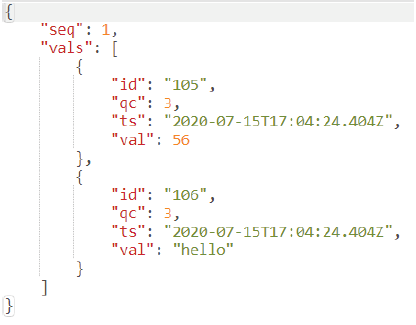
Where
| Abbreviation | Description |
|---|---|
| seq | Unique sequence number of the payload |
| vals | Array of data points published in the payload |
| id | Unique identification of data point. You must fetch the tag ID from metadata payload based on the tag name. |
| qc | Quality code. It is an optional field. It provides specific integer value to indicate the quality of the data point value. |
| ts | Timestamp of the data point. It is an optional field. it is in ISO 8601 Zulu format. |
| val | Tag value. Based on the data type of the data point, the value can be simple scalar value. |
Note
You can use the metadata to get the tag id published from the SIMATIC S7 connector for 'Tag Write' functionality. You can use this tag id in the Publisher (MQTT) to write value for that tag.
If you have configured fixed length string datatype in the TIA Portal, then you need to provide the length of the string when configuring the tag in S7 Connector or by default the string length is set to 210 for S7-Protocol (S7-300/400/1200/1500).
If you have configured fixed length string datatype in the TIA Portal, then you need to provide the length of the string when configuring the tag in S7 Connector or by default the string length is set to 254 for Optimized S7-Protocol (S7-1200/1500).
Topic Structure for Data and Metadata
The general topic structure consists of the following elements:
ie/{payloadType}/{encoding}/{msgStructureScheme}/{msgStructureSchemeVersion}/{provideAppInstanceId}/
{payloadMsgType}/{accessmode}/{connectionname}/{collectionname}
The recommended structure of topic naming is as follows:
ie/{payloadType}/{encoding}/{msgStructureScheme}/{msgStructureSchemeVersion}/{provideAppInstanceId}/
{payloadMsgType}
The following table explains the above elements:
| Element | Description | Possible Values |
|---|---|---|
| payloadType | Payload type | 'd' for data, 'm' for metadata, 's' for status |
| encoding | Payload encoding | 'j' for JSON |
| msgStructureScheme | Payload format schema model | simatic |
| msgStructureSchemeVersion | Payload format schema version number | v1 |
| provideAppInstanceId | Unique ID of provider app | 's7c1' for SIMATIC S7 Connector instance 1 |
| payloadMsgType | Payload message content | 'dp': data points for PLC variables, 'ev': events for PLC full text and HMI alarms |
| accessmode | App specific element. Indicates the purpose of the payload for SIMATIC S7 Connector as it would support both read and write of Data Points. | 'r': read from connectors, 'w': write to connectors |
| connectionname | App specific element. Indicates unique name provided in Connector for a connection to a PLC in SIMATIC S7 Connector. | Example: Paintshop1PLC |
| collectionname | App specific element. Indicates collection name | 'default' for tags published in bulk mode |
Topic Name Structure
To publish data from the SIMATIC S7 Connector to the Databus, you must create topics for alarms and tags data for the user in the Industrial Edge Databus in the following topic name structure:
| Topic | Description |
|---|---|
| ie/m/j/simatic/v1/s7c1/dp | For tags metadata |
| ie/d/j/simatic/v1/s7c1/dp/r/# | For tags data |
| ie/m/j/simatic/v1/s7c1/ev | For alarms metadata |
| ie/d/j/simatic/v1/s7c1/ev/# | For alarms data |
| ie/s/j/simatic/v1/s7c1/status | For connector and connection status |
| Abbreviation | Description |
|---|---|
| ie | Industrial Edge |
| m | Payload type: metadata |
| j | Payload encoding: json |
| simatic | Payload format schema model: simatic |
| v1 | Payload format schema version number: v1 |
| s7c1 | Unique id of provider app: SIMATIC S7 Connector instance 1 |
| dp | Payload message content: data points for PLC variables |
| d | Payload type: data |
| r | Purpose of the payload for SIMATIC S7 Connector: read |
| # | All subtopics |
| ev | Payload message content: events for PLC Fulltext Alarms, HMI Alarms |
| s | Payload type: status |
| status | SIMATIC S7 Connector App status |
Example
Topic ie/d/j/simatic/v1/s7c1/dp/r/FA_Drives/#
| Abbreviation | Description |
|---|---|
| ie | Industrial Edge |
| d | Payload type: data |
| j | Payload encoding: json |
| simatic | Payload format schema model: simatic |
| v1 | Payload format schema version number: v1 |
| s7c1 | Unique id of provider app: SIMATIC S7 Connector instance 1 |
| dp | Payload message content: data points |
| r | Purpose of the payload for SIMATIC S7 Connector: read |
| FA_Drives | Data source name |
| # | All subtopics under FA_Drives |
In that case, the SIMATIC S7 Connector can publish data cyclically to the Databus on the configured subtopics of ‘FA_Drives’.
Publish Tag Data
In the bulk publish mode, all tag data are published in a group in the following topic format:
ie/d/j/simatic/v1/s7c1/dp/r/<connection-name>/default
| Abbreviation | Description |
|---|---|
| ie | Industrial Edge |
| d | Payload type: data |
| j | Payload encoding: json |
| simatic | Payload format schema model: simatic |
| v1 | Payload format schema version number: v1 |
| s7c1 | Unique id of provider app: SIMATIC S7 Connector instance 1 |
| dp | Payload message content: data points |
| r | Purpose of the payload for SIMATIC S7 Connector: read |
| default | Group name of connection for tags published in bulk mode |
The JSON structure is as follows:
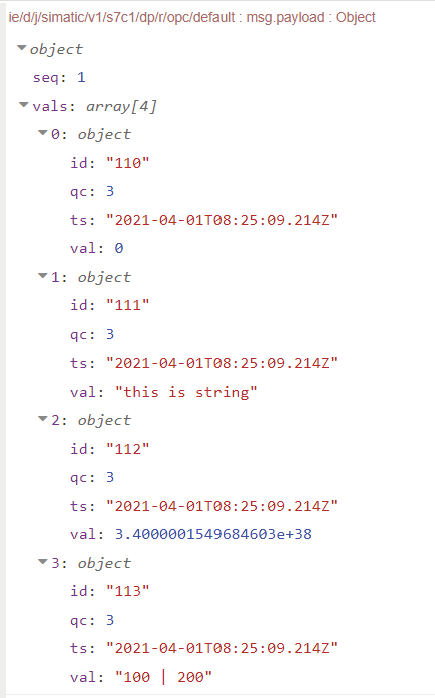
Where:
| Member | Description |
|---|---|
| seq | Unique sequence number of the payload |
| vals | Array of data points published in the payload |
| id | Unique identification of the data point. You must fetch the tag ID from metadata payload based on the tag name. |
| qc | Quality code. It provides specific integer value to indicate the quality of the data point value. More details on the qc value you can find below |
| ts | Time stamp of the data point. It is in ISO 8601 Zulu format. |
| val | Tag value. Based on the data type of the data point, the value can be simple scalar value. |
qc value is published in decimal which represents the sixth and seventh bit in the quality data:
qc value |
Meaning | Description |
|---|---|---|
| 0 | BAD | The value is not useful for reasons indicated by the sub-status. |
| 1 | UNCERTAIN | The quality of the value is less than normal, but the value may still be useful. The reason is indicated by the sub-status. |
| 2 | GOOD (non-cascade) | The quality of the value is good. |
| 3 | GOOD (cascade) | The quality of the value is good and may be used in control. |
Extended Quality Code
With the SIMATIC S7 Configurator version 1.1, only qc quality code is published. qc indicates quality of the data (i.e., BAD, UNCERTAIN, GOOD (non-cascade), GOOD (cascade)) without any additional details.
With the SIMATIC S7 Configurator version 1.2, qx (extended quality code) is published along with qc, if there is any additional information to the qc quality code available. qx holds all bits to: quality code, sub status, extended sub status, flags, and limits (see picture below). qx is published in decimal value, for example, 192. You must convert it into binary to get the bit information. The meaning of bit values is described below.
16-bit quality is defined as below:

Limits (bits 0,1)
| Value | Meaning | Description |
|---|---|---|
| 0 | Ok | Data quality unrelated to limits. |
| 1 | Low limit violation | The value has exceeded its low limit. |
| 2 | High limit violation | The value has exceeded its high limit. |
| 3 | Constant | The value cannot move, no matter what the process does. |
Sub-status "BAD" (sub-status bits 2...5)
| Value | Meaning | Description |
|---|---|---|
| 0 | Non-specific | There is no specific reason why the value is BAD. |
| 1 | Configuration error | The value is not useful because of some inconsistency regarding the configuration. |
| 2 | Not connected | The value is not reliable because the connection to the provider has been disconnected at consumer-side. For example, a communication driver actively disconnects from a PLC on user request or by design. |
| 4 | Sensor failure | The value is not useful because it cannot be converted. A value from the device (PLC) cannot be converted to the corresponding HMI tag. |
| 5 | No communication, with last usable value | The value is not useful because the communication to the data source failed, however a last known value is available. |
| 6 | No communication, no usable value | The value is not useful because the communication to the data source failed or has never been established since it was last out of service and a last known value is not available. |
| 7 | Out of service | The value is not reliable because the provider side has been disabled or shutdown. For example, a PLC is in stop mode or a tag is disabled for maintenance purposes. |
Sub-status "UNCERTAIN" (sub-status bits 2...5)
| Value | Meaning | Description |
|---|---|---|
| 0 | Non-specific | There is no specific reason why the value is UNCERTAIN. |
| 1 | Last usable value | The connection to the data source is still established, however, the data source stopped updating the value for some reason. |
| 2 | Substitute value | A predefined value is used in case of an invalid value due to communication issues with the data source or a range violation. The reason for providing substitute values is configurable. |
| 3 | Initial value | A predefined value intended for the startup of the HMI system (or a subordinate device) is used while not being able to provide values from the data source. |
| 5 | Range violation | The value lies outside the range defined by minimum value and maximum value. The limits define which direction (min or max) has been exceeded. |
| 6 | Sub-normal | A value derived from multiple values has less than the required number of good sources. This includes data aggregation by means of data compression algorithms. |
Sub-status "GOOD (cascade)" (sub-status bits 2...5)
| Value | Meaning | Description |
|---|---|---|
| 0 | Non-specific | No error or special condition is associated with this value. |
| 6 | Local override | The value has been overridden by the user or some logic in to continue operation. Typically, the input has been disconnected and a manually entered value has been 'forced', or a value has been corrected. |
Quality (bits 6,7)
| Value | Meaning | Description |
|---|---|---|
| 0 | BAD | The value is not useful for reasons indicated by the sub-status. |
| 1 | UNCERTAIN | The quality of the value is less than normal, but the value may still be useful. The reason is indicated by the sub-status. |
| 2 | GOOD (non-cascade) | The quality of the value is good. |
| 3 | GOOD (cascade) | The quality of the value is good and may be used in control. |
Extended sub-status "BAD" (sub-status bits 8...11)
| Value | Meaning | Description |
|---|---|---|
| 0 | Non-specific | No CHROM specific extended bad sub-status is associated with this value. |
| 1 | Aggregated value | The value has been calculated out of multiple values with less than the required number of good sources. This includes data aggregation by means of data compression algorithms. The corresponding sub-status is set to 'non-specific'. |
| 3 | Unusable value | A (logged) value has been identified to be incorrect, but a respective correction value is not available. The corresponding sub-status is set to 'non-specific'. |
| 7 | Disabled | The provider of the value (logging tag for logged value) has been disabled and the previous value was BAD. The corresponding sub-status is taken from the last (previous) sub-status. |
Extended sub-status "UNCERTAIN" (sub-status bits 8...11)
| Value | Meaning | Description |
|---|---|---|
| 0 | Non-specific | No CHROM specific extended uncertain sub-status is associated with this value. |
| 1 | Aggregated value | The value has been calculated out of multiple values with less than the required number of good sources to be GOOD as well as less than required number of bad sources to be BAD. This includes data aggregation by means of data compression algorithms. The corresponding sub-status is set to 'non-specific'. |
| 7 | Disabled | The provider of the value (logging tag for logged value) has been disabled and the previous value was GOOD or UNCERTAIN. In case of GOOD, the corresponding sub-status is set to 'last usable value'. In case of UNCERTAIN, the corresponding sub-status is taken from the last (previous) sub-status. |
Extended sub-status "GOOD (cascade)" (sub-status bits 8...11)
| Value | Meaning | Description |
|---|---|---|
| 0 | Non-specific | No CHROM specific extended good sub-status is associated with this value. |
| 1 | Aggregated value | The value has been calculated out of multiple (good) values. This includes data aggregation by means of data compression algorithms. The corresponding sub-status is set to 'non-specific'. |
| 2 | Manual input | A (logged) value has been created manually. The corresponding substatus is set to 'non-specific'. |
| 3 | Corrected value | A (logged) value has been corrected. The corresponding sub-status is set to 'non-specific'. |
| 4 | Last usable value | The local data source has been initialized with the last usable value if present inside a local persistency. The corresponding sub-status is set to 'non-specific'. |
| 6 | Initial value | The local data source has been initialized with the configured initial value. The corresponding sub-status is set to 'non-specific'. |
Flags (bits 12...15)
| Value | Meaning | Description |
|---|---|---|
| Bit 12 | Source quality | The data quality has been determined and assigned by external data source. |
| Bit 13 | Source time | The data timestamp has been produced and assigned by external data source. |
| Bit 14 | Time corrected | The data timestamp applied by external data source has been corrected by the system. Thus, Bit 13 "Source time" is not set. Time correction happens if the external timestamp is older than the timestamp of the last known value. |
Publish Alarm Data
The bulk publish mode does not apply for alarm data. The topic format for alarm data is as follows:
ie/d/j/simatic/v1/s7c1/ev/<connection-name>/FullText
| Abbreviation | Description |
|---|---|
| ie | Industrial Edge |
| d | Payload type: data |
| j | Payload encoding: json |
| simatic | Payload format schema model: simatic |
| v1 | Payload format schema version number: v1 |
| s7c1 | Unique id of provider app: SIMATIC S7 Connector instance 1 |
| ev | Payload message content: events |
| FullText | Full text alarms define alarm texts which are received directly from the PLC |
The JSON structure is as follows:
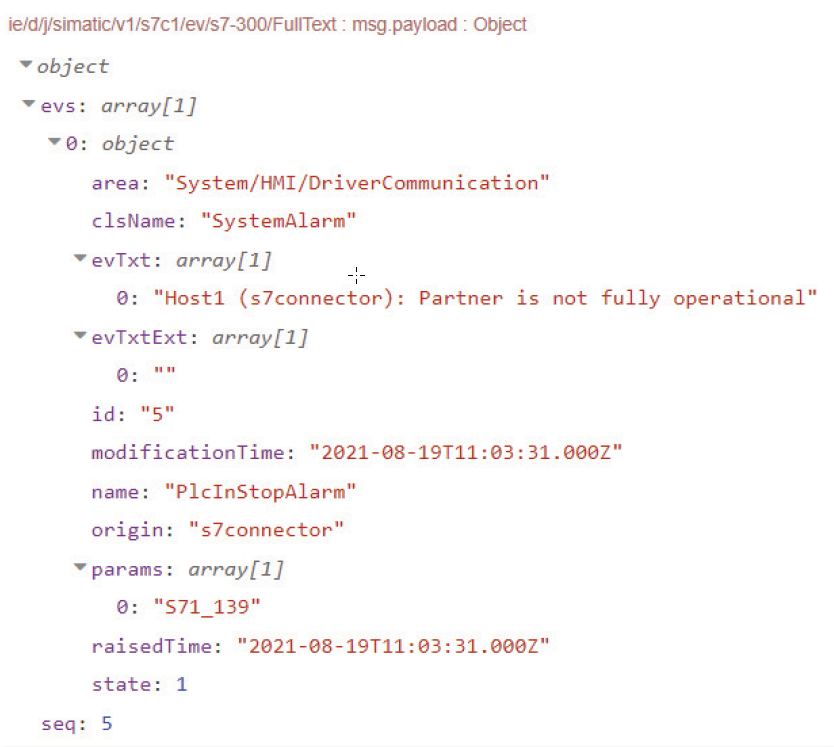
Where:
| Member | Description |
|---|---|
| evs | Array of events published in the payload. |
| area | String containing the configured area information of the event. |
| clsName | Name of the class of the event. |
| evTxt | Event text. This may contain array of objects based on the event source. |
| evTxtExt | Array of string containing additional texts of the events. |
| id | Unique identification of the event. |
| modificationTime | Event's last modified timestamp in UTC format. |
| name | Name of the event. |
| origin | String containing the origin of the event. |
| params | Array of parameters of the event. |
| raisedTime | Event's raised timestamp in UTC format. |
| state | Integer that indicates the state of the event (provider specific). For information on possible values see table below. |
| seq | Unique sequence number of the payload. |
| State value | Description |
|---|---|
| 0 | Normal |
| 1 | Alarm is raised |
| 2 | Raised and cleared |
Publish Tag Metadata
When deploying a project, the metadata is also published. The topic format for tag metadata is as follows:
ie/m/j/simatic/v1/s7c1/dp
Where:
| Abbreviation | Description |
|---|---|
| ie | Industrial Edge |
| m | Payload type: metadata |
| j | Payload encoding: json |
| simatic | Payload format schema model: simatic |
| v1 | Payload format schema version number: v1 |
| s7c1 | Unique id of provider app: SIMATIC S7 Connector instance 1 |
| dp | Payload message content: data points |
In the bulk publish mode, the JSON structure for tag metadata is as follows:
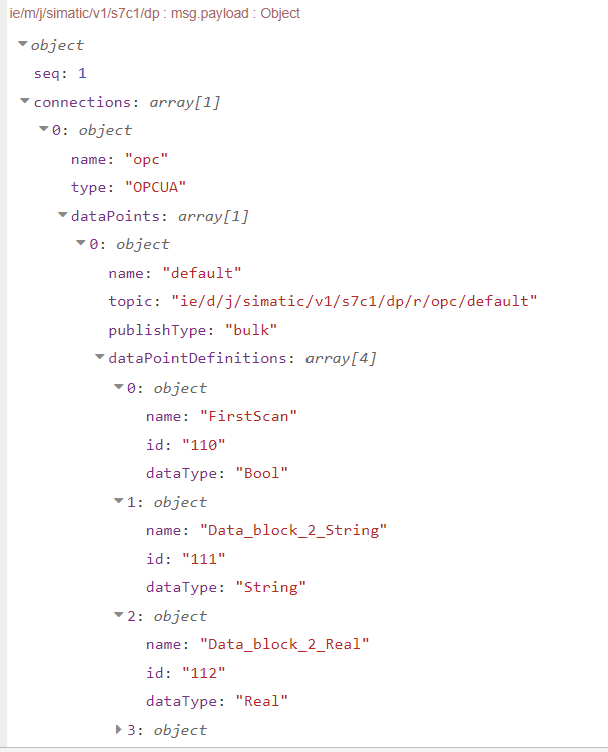
Where:
| Member | Description |
|---|---|
| seq | Unique sequence number of the payload |
| connections | Array of connections published in the payload |
| name | Connection name |
| type | Connection type, e.g. OPCUA |
| dataPoints | Array of the connection data points |
| name | Data point name |
| topic | Topic on which the data point data is published |
| publishType | Publish type of the data point |
| dataPointDefinitions | Array of data point definitions |
| name | Data point name |
| id | Data point id |
| dataType | Data point type |
Publish Alarm Metadata
The topic format for alarm metadata is as follows:
ie/m/j/simatic/v1/s7c1/ev
| Abbreviation | Description |
|---|---|
| ie | Industrial Edge |
| m | Payload type: metadata |
| j | Payload encoding: json |
| simatic | Payload format schema model: simatic |
| v1 | Payload format schema version number: v1 |
| s7c1 | Unique id of provider app: SIMATIC S7 Connector instance 1 |
| ev | Payload message content: events for PLC Fulltext Alarms, HMI Alarms |
The JSON structure for alarm metadata is as follows:
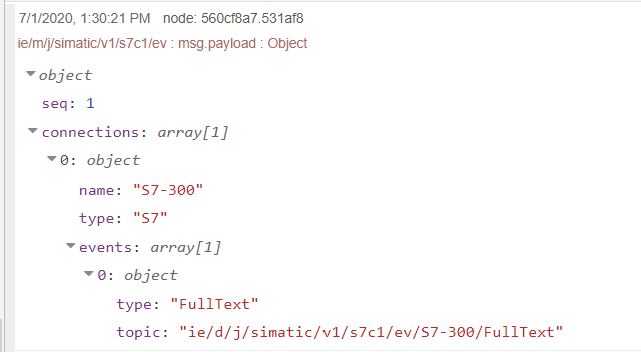
Where:
| Member | Description |
|---|---|
| seq | Unique sequence number of the payload |
| connections | Array of connections published in the payload |
| name | Connection name |
| type | Connection type |
| events | Array of the connection events |
| type | Event type |
| topic | Topic on which the event is published |
Note Alarms metadata is published only when you deploy S7 Connection with 'Full Text Alarm' checkbox enabled before starting the project. Once you start the Industrial Edge Runtime, you cannot configure 'Full Text Alarms' checkbox. Therefore, the alarms metadata is not published in this case.
Connector and Connection Status
When you successfully deploy a project, the Connector birth message, connector status message and the metadata are published as follows:
MQTT topic: ie/s/j/simatic/v1/s7c1/status
{
  "connector": {
    "status": "available",
    "reason": "Databus connection established"
  }
}
MQTT topic: ie/s/j/simatic/v1/s7c1/status
{
  "seq": 1,
  "ts": "2021-10-08T08:50:01Z",
  "connector": {
    "status": "bad",
    "reason": "alarmData, tagData disconnected"
  },
  "connections": null
}
When you successfully start a project, the Connector and Connection status are published with tag and alarm data package as follows:
MQTT topic: ie/s/j/simatic/v1/s7c1/status
{
  "seq": 2,
  "ts": "2021-10-08T09:45:19Z",
  "connector": {
    "status": "good",
    "reason": "string"
  },
  "connections": [
    {
      "name": "PLC_1",
      "status": "good"
    },
    {
      "name": "PLC_2",
      "status": "bad"
    }
  ]
}
When you successfully stop a project, the Connector Will message is published by the broker as follows:
MQTT topic: ie/s/j/simatic/v1/s7c1/status
{
  "connector": {
      "reason": "Databus connection lost",
      "status": "unavailable"
    }
}
Note:
- The “available” connector status indicates that the SIMATIC S7 Connector is up and started, the “unavailable” status indicates that the SIMATIC S7 Connector is down.
- The “bad” connector status indicates that at least one of the connector clients is not connected to the Databus. More information will be provided in the reason field of the connector data.
- The “good” connector status indicates that all the connector clients are connected to the Databus.
- The “bad” connection status indicates that the connection to the target device could not be established.
- The “good” connection status indicates that the connection to the target device is established.